Services · 6 disciplines · 23 offerings

From the first assessment to a fully documented system.

Bring us a single problem or a complete modernization. Every engagement is scoped to your environment, and the engineer who plans the work carries it out.

Where to start

Three ways to begin, depending on what you already know.

Paid · scoped in advance

Infrastructure assessment

For when you need a clear picture before deciding what to do: a structured review with written findings and prioritized recommendations.

  • Scope and price agreed in writing
  • Findings you keep, whoever does the work
About assessments
Fixed scope or hourly

Defined project

For when you already know what you need, such as a new network, a backup overhaul or a server replacement.

  • Written proposal and statement of work
  • Clear deliverables and milestones
How projects run

Technology Advisory and Assessments

Understand what you have, where the risks are, and what to do next, in an order that makes sense for your budget.

A good fit if you're planning upgrades, inheriting an unfamiliar environment, or unsure what to prioritize.

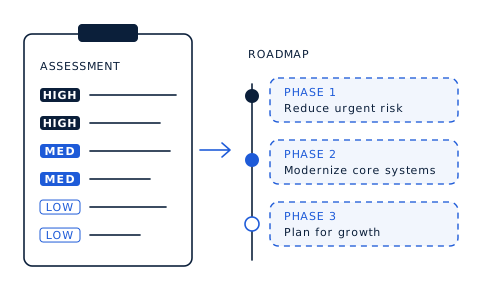
Illustration: assessment findings ranked high, medium and low priority, feeding a three-phase roadmap from reducing urgent risk to planning for growth.

Initial Technology Consultation

Complimentary

A conversation of about 20 minutes to understand your business, the challenge in front of you, and whether working together makes sense.

What's includedHide details for Initial Technology Consultation
  • Your business and how technology supports it
  • The problem or project you have in mind
  • Whether a paid assessment, a defined project or another route makes most sense

This is an introductory conversation. It is not an assessment of your systems, and no work is performed.
Business Infrastructure Assessment

Paid · scoped

A structured review of your existing technology environment, delivered as clear findings and prioritized recommendations.

What's includedHide details for Business Infrastructure Assessment
  • Networking equipment and configuration
  • Servers, storage and backups
  • System configurations and existing documentation
  • Operational risks and single points of failure
  • Written findings, identified weaknesses and prioritized improvements

The scope is agreed in writing before the assessment begins.

Technology Planning and Roadmap

A practical improvement plan aligned with your business priorities, timeline and budget.

What's includedHide details for Technology Planning and Roadmap
  • Equipment recommendations
  • Modernization phases and dependencies
  • Security improvements
  • Planning for growth and future needs

Network Infrastructure and Engineering

Fast, stable and secure connectivity that's designed rather than accumulated, from one office to several.

A good fit if your Wi-Fi is unreliable, your network has grown without a plan, or you're opening a new location.

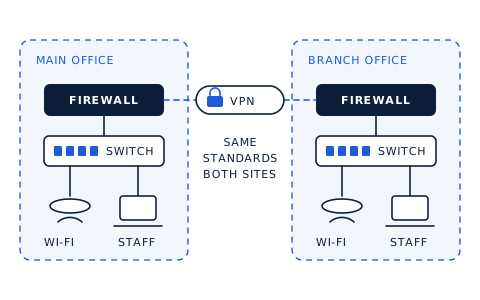
Illustration: a main office and a branch office, each with a firewall, switch, Wi-Fi and staff devices, connected by an encrypted VPN link and built to the same standards.

Business Network Setup and Installation

Design, installation and configuration of routers, switches, firewalls and wireless access points.

What's includedHide details for Business Network Setup and Installation
  • Network design for your space, headcount and growth
  • Equipment configuration and testing
  • Wireless planning for reliable coverage
  • Documentation of the finished network

Structured cabling is carried out by appropriately licensed contractors where Florida law requires it.

Network Troubleshooting and Optimization

Finding and fixing the underlying causes of slow, intermittent or unreliable connectivity.

What's includedHide details for Network Troubleshooting and Optimization
  • Diagnosis of performance and connectivity issues
  • Configuration review and cleanup
  • Reliability and performance improvements

Network Security and Segmentation

Separating guests, staff and critical systems using VLANs, firewall policies and access restrictions.

What's includedHide details for Network Security and Segmentation
  • Network segmentation design
  • Firewall policies between segments
  • Isolated guest Wi-Fi
  • Access restrictions for sensitive systems

Multi-Location Network Design and Connectivity

Secure, consistent connectivity and configuration standards across your business locations.

What's includedHide details for Multi-Location Network Design and Connectivity
  • Site-to-site connectivity planning and setup
  • Consistent equipment and configuration standards
  • Documentation for every site

We typically work with one to three locations. Projects of up to about five locations are considered depending on complexity.

Data Storage, Backup and Recovery

Keep business data available, protected and recoverable, and know your backups work before you need them.

A good fit if you're running out of storage, unsure your backups are complete, or have never tested a restore.

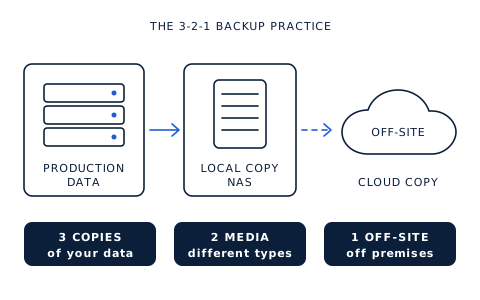
Illustration of the 3-2-1 backup practice: production data copied to a local NAS and to an off-site cloud copy, for three copies on two types of media with one off site.

Business Storage and NAS Solutions

Design, deployment and configuration of network-attached storage and other business storage systems.

What's includedHide details for Business Storage and NAS Solutions
  • Capacity and growth planning
  • Shared folders and access permissions
  • Integration with your backup approach

Backup Strategy and Implementation

Backups designed around what your business can't afford to lose, with verification built in.

What's includedHide details for Backup Strategy and Implementation
  • Identifying critical data and systems
  • Retention and scheduling
  • Local and off-site storage destinations
  • Verification and restore testing practices

Data Migration and Storage Modernization

Planned, careful moves between storage platforms, systems or environments.

What's includedHide details for Data Migration and Storage Modernization
  • Migration planning and sequencing
  • Data transfer and verification
  • Minimizing disruption to your team

Disaster Recovery Planning and Testing

Recovery procedures and tests that prepare you for hardware failure, outages and data loss.

What's includedHide details for Disaster Recovery Planning and Testing
  • Recovery priorities for critical systems
  • Documented recovery procedures
  • Recovery testing and lessons learned

Planning and testing improve your readiness and reveal gaps. No provider can guarantee recovery in every circumstance.

Servers, Cloud and Infrastructure Modernization

The platforms your operations run on, standardized, documented and ready to grow.

A good fit if you rely on an aging server, run a mix of on-premises and cloud services, or need to consolidate.

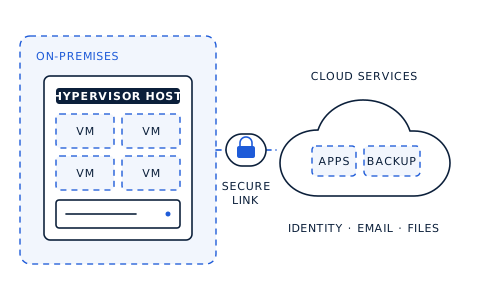
Illustration: an on-premises hypervisor host running several virtual machines, connected by a secure link to cloud services for applications, backup, identity, email and files.

Business Server Deployment and Configuration

Windows and Linux server environments built around your business requirements.

What's includedHide details for Business Server Deployment and Configuration
  • Requirements and sizing
  • Installation and configuration
  • Roles, permissions and documentation

Virtualization and Infrastructure Consolidation

Fewer, better-managed systems through virtualization where it makes sense.

What's includedHide details for Virtualization and Infrastructure Consolidation
  • Consolidation assessment
  • Virtualization platform design and deployment
  • Migration of existing workloads

Cloud and Hybrid Infrastructure Integration

Connecting and modernizing on-premises and cloud-based infrastructure.

What's includedHide details for Cloud and Hybrid Infrastructure Integration
  • Deciding what belongs on-premises and what belongs in the cloud
  • Secure connectivity between environments
  • Migration planning

Infrastructure Upgrades and Modernization

Replacing, standardizing and documenting aging or inconsistent equipment.

What's includedHide details for Infrastructure Upgrades and Modernization
  • Lifecycle and support status review
  • Phased replacement planning
  • Standardized configurations and documentation

Infrastructure Security and Hardening

Practical security built into the infrastructure itself: firewall, network, systems and access.

A good fit if you've never had your security configuration reviewed, or you know there are gaps but not where to start.

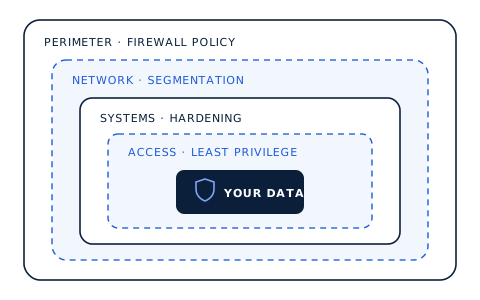
Illustration of layered infrastructure security: perimeter firewall policy, network segmentation, system hardening and least-privilege access surrounding business data.

Infrastructure Security Assessments

Scoped reviews of your security configurations, practices and potential weaknesses.

What's includedHide details for Infrastructure Security Assessments
  • Firewall and network configuration review
  • System configuration review
  • Administrative access practices
  • Prioritized findings

These are configuration reviews. They are not penetration tests or formal compliance audits.

Network Security and Firewall Configuration

Configuring and improving firewall rules, network access policies and security controls.

What's includedHide details for Network Security and Firewall Configuration
  • Firewall rule review and cleanup
  • Remote access configuration
  • Network access policies

Server and System Hardening

Operating system and server configurations that reduce unnecessary exposure.

What's includedHide details for Server and System Hardening
  • Removing unnecessary services and access
  • Secure configuration baselines
  • Update and patching approach

Security Improvement Planning and Remediation

A prioritized list of security improvements, followed by the work to put them in place.

What's includedHide details for Security Improvement Planning and Remediation
  • Prioritized improvement plan
  • Implementation of agreed fixes
  • Documentation of changes

Systems Integration, Automation and AI

Connect your business systems and remove repetitive work. AI is recommended only where it provides practical value.

A good fit if your team re-enters the same information in several places or spends hours on manual, repeatable tasks.

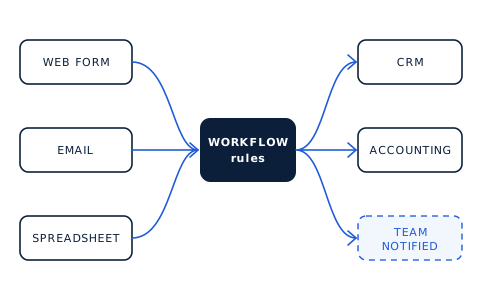
Illustration: a web form, email and spreadsheet feeding a central workflow, which updates a CRM, accounting software and notifies the team automatically.

Business Systems Integration

Getting your existing applications, services and platforms to work together.

What's includedHide details for Business Systems Integration
  • Mapping how information moves between systems
  • Connecting applications and services
  • Testing and documentation

Business Process and Workflow Automation

Practical automations that cut repetitive tasks and improve how information flows.

What's includedHide details for Business Process and Workflow Automation
  • Identifying repeatable tasks
  • Building and testing automations
  • Handover and documentation

AI Assistants and Knowledge-Based Chatbots

Appropriately scoped assistants that answer questions from your approved business information.

What's includedHide details for AI Assistants and Knowledge-Based Chatbots
  • Uses retrieval-augmented generation (RAG): the assistant looks up answers in sources you approve
  • Clear limits on what the assistant can access and answer
  • Attention to privacy, reliability and running costs

Automation and AI Opportunity Assessments

An honest evaluation of where automation or AI would help your business, and where it wouldn't.

What's includedHide details for Automation and AI Opportunity Assessments
  • Review of current processes
  • Opportunities ranked by practical value
  • Recommendations you can act on

How we work

How engagements work

Every engagement follows the same principle: understand the business first, agree the scope in writing, then design, build, test and document.

  1. Step 1 · Free

    Introductory consultation

    A short conversation about your business, the challenge and whether we're a good fit.

  2. Step 2

    Discovery

    We learn more about your environment and requirements so we can recommend the right next step.

  3. Step 3

    Assessment or scoping

    A paid assessment where the picture is unclear, or a defined scope for a known project.

  4. Step 4

    Proposal

    A written proposal and statement of work covering deliverables, timeline, pricing and milestones.

  5. Step 5

    Approval

    Work is scheduled once you approve the proposal and any applicable deposit is received.

  6. Step 6

    Engineering

    Design, configuration and deployment, coordinated with your team to limit disruption.

  7. Step 7

    Testing and documentation

    We verify the work and document what was built and how it's configured.

  8. Step 8

    Handoff

    A walkthrough so your team understands the system and knows where everything is.

  9. Optional

    Ongoing advisory

    Continued strategic guidance or future project work, if it's useful to you.

Ways to engage

Scoped and quoted in writing, every time.

Every environment is different, so we don't publish a one-size-fits-all price list. You'll receive a written proposal with a clear scope before any paid work begins.

Hardware and software are client-funded: we recommend and specify equipment, and your business owns it. Larger projects use deposits and clearly defined payment milestones.

Fixed-scope projects

A defined outcome at an agreed price.

Hourly engineering

For troubleshooting and work that's hard to scope up front.

Paid assessments

A structured starting point when the path isn't clear yet.

Technology planning

Roadmaps and decisions aligned to your goals and budget.

Ongoing advisory

Periodic strategic guidance as your business grows.

Support for IT teams

Specialist engineering alongside your existing IT staff.

Common questions

Before you get in touch

Is the first consultation really free?

Yes. The introductory consultation is about 20 minutes and costs nothing. It's a conversation to understand your needs and decide on a sensible next step. A detailed review of your systems is a separate, paid infrastructure assessment, scoped and agreed in advance.

How much does a project cost?

It depends on scope, complexity and the equipment involved. After the consultation and any required scoping, you'll receive a written proposal with pricing before any paid work begins. Projects are quoted as a fixed price or billed hourly, whichever suits the work.

Where do you work?

On-site work is available throughout South Florida. Advisory, planning, remote configuration and some engineering projects can be delivered remotely for businesses outside the area.

Can you work with our existing IT staff or provider?

Yes. Many projects involve collaborating with an internal IT person or team. We act as a specialist engineering resource for a defined project and make sure your team understands, and can maintain, what we build.

Do you offer ongoing support or a help desk?

Ironcrest focuses on advisory and project-based engineering, with optional ongoing advisory arrangements. We don't currently provide help desk, 24/7 monitoring or emergency response services. Scheduling and availability are always set out clearly in your proposal.

Do you install network cabling?

We design networks and configure equipment ourselves. Structured cabling and other regulated work is carried out by appropriately licensed contractors where Florida law requires it, and coordinated as part of the project.

Not sure which service you need?

That's what the consultation is for. Describe the problem, and we'll help you find the right starting point.